
Lesson 1: Get started
In Lesson 1, you learn how to work with the Kotlin REPL (Read-Eval-Print Loop) interactive shell, and you practice using the basic syntax of Kotlin code.
Introduction
Since 2017, Google has officially supported Kotlin for developing Android apps. Read the announcement on the Android Developers Blog. This course content is a prerequisite of Android Kotlin Fundamentals.
What you should already know
You should be familiar with:
- The basics of a modern, object-oriented, statically typed programming language such as Java or C#
- How to program with classes, methods, and exception handling in at least one language
- Using an IDE such as IntelliJ IDEA, Android Studio, Eclipse, or Visual Studio
What you'll learn
- How to work with the Kotlin REPL (Read-Eval-Print Loop) interactive shell
- The basic syntax of Kotlin code
2. Benefits of Kotlin
Kotlin is a new, modern programming language created by programmers, for programmers. It's focused on clarity, conciseness, and code safety.
Robust code
The creators of Kotlin made various design decisions about the language to help programmers create robust code. For example, null-pointer exceptions in software have caused financial losses and spectacular computer crashes, and have resulted in countless hours of debugging. So Kotlin distinguishes between nullable and non-nullable data types, which helps catch more errors at compile time. Kotlin is strongly typed, and it does a lot to infer the types from your code. It has lambdas, coroutines, and properties, which allow you to write less code with fewer bugs.
Concise, readable code
Code written in Kotlin can be very concise, and the language is designed to eliminate boilerplate code such as getters and setters. For example, consider the following Java code:
public class Aquarium {

   private int mTemperature;

   public Aquarium() { }

   public int getTemperature() {
       return mTemperature;
   }

   public void setTemperature(int mTemperature) {
       this.mTemperature = mTemperature;
   }

   @Override
   public String toString() {
       return "Aquarium{" +
               "mTemperature=" + mTemperature +
               '}';
   }
}
It can be written concisely like this in Kotlin:
data class Aquarium (var temperature: Int = 0)
Sometimes the goals of conciseness and readability are at odds with each other. Kotlin is designed to use "just enough boilerplate code" to ensure readability while keeping things concise.
Interoperable with Java
Kotlin code compiles so that you can use Java and Kotlin code side-by-side, and continue to use your favorite Java libraries. You can add Kotlin code to an existing Java program, or if you want to migrate your program completely, IntelliJ IDEA and Android Studio both include tools to migrate existing Java code to Kotlin code.
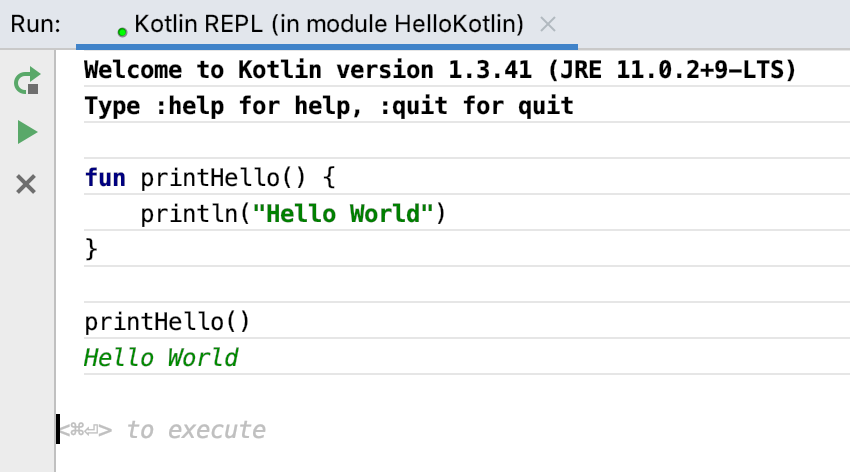
fun printHello() {
println("Hello World")}printHello()
6. Summary
- Kotlin is similar to other object-oriented programming languages.
- Install the latest JDK for your operating system to use Kotlin.
- Install the IntelliJ IDEA to work with Kotlin.
- In IntelliJ IDEA, start the Kotlin REPL (Tools > Kotlin > Kotlin REPL) to practice in an interactive shell.
- Enter code followed by
Control+Enter(Command+Enteron a Mac) to run it. - Here is "Hello World" in Kotlin:
fun printHello() {
    println ("Hello World")
}

printHello()
7. Learn more
Kotlin documentation
If you want more information on any topic in this course, or if you get stuck, https://kotlinlang.org is your best starting point.
Kotlin tutorials
The https://play.kotlinlang.org website includes rich tutorials called Kotlin Koans, a web-based interpreter, and a complete set of reference documentation with examples.
Udacity course
To view the Udacity course on this topic, see Kotlin Bootcamp for Programmers.
IntelliJ IDEA
Documentation for the IntelliJ IDEA can be found on the JetBrains website.
8. Homework
This section lists possible homework assignments for students who are working through this codelab as part of a course led by an instructor. It's up to the instructor to do the following:
- Assign homework if required.
- Communicate to students how to submit homework assignments.
- Grade the homework assignments.
Instructors can use these suggestions as little or as much as they want, and should feel free to assign any other homework they feel is appropriate.
If you're working through this codelab on your own, feel free to use these homework assignments to test your knowledge.
Answer these questions
Question 1
Which of the following is NOT a benefit of using the Kotlin language?
▢ Kotlin distinguishes between nullable and non-nullable data types.
▢ Kotlin is a supported language for building Android apps.
▢ Kotlin is designed so you can write less code with fewer bugs.
▢ Your code compiles faster in Kotlin.
Question 2
How do you start the Kotlin REPL?
▢ Type repl on the command line.
▢ Create a Kotlin project in IntelliJ IDEA, then select Run > Kotlin REPL.
▢ Open IntelliJ IDEA, then select File > Kotlin REPL.
▢ Create a Kotlin project in IntelliJ IDEA, then select Tools > Kotlin > Kotlin REPL.
Question 3
Which of the following is NOT true about Kotlin and Java code?
▢ Kotlin code and Java code can run side-by-side.
▢ You can add Kotlin code to an existing Java program.
▢ You can migrate existing Java code to Kotlin.
▢ Kotlin code will run faster than Java code.
9. Next codelab
Proceed to the next lesson:
For an overview of the course, including links to other codelabs, see "Kotlin Bootcamp for Programmers: Welcome to the course."
Lesson 2: Kotlin basics
In Lesson 2, you learn how to use Kotlin data types, operators, and variables, and how to work with booleans and conditions. You explore the difference between nullable and non-nullable variables, and you practice using arrays, lists, and loops in Kotlin.
Introduction
In this codelab, you learn the basics of the Kotlin programming language: data types, operators, variables, control structures, and nullable versus non-nullable variables. This course is geared toward programmers who know an object-oriented language, and want to learn Kotlin.
What you'll learn
- How to use Kotlin data types, operators, and variables
- How to work with booleans and conditions
- The difference between nullable and non-nullable variables
- How arrays, lists, and loops work in Kotlin
What you'll do
- Work with the Kotlin REPL to learn the basics of Kotlin
2. Task: Learn about operators and types
Step 1: Explore numeric operators
As with other languages, Kotlin uses +, -, * and / for plus, minus, times and division. Kotlin also supports different number types, such as Int, Long, Double, and Float.
1+1
⇒ res8: kotlin.Int = 2

53-3
⇒ res9: kotlin.Int = 50

50/10
⇒ res10: kotlin.Int = 5

1.0/2.0
⇒ res11: kotlin.Double = 0.5

2.0*3.5
⇒ res12: kotlin.Double = 7.0
Note that results of operations keep the types of the operands, so 1/2 = 0, but 1.0/2.0 = 0.5.
Try some expressions with different combinations of integer and decimal numbers.6*50 ⇒ res13: kotlin.Int = 300 6.0*50.0 ⇒ res14: kotlin.Double = 300.0 6.0*50 ⇒ res15: kotlin.Double = 300.0
2.times(3)
⇒ res5: kotlin.Int = 6

3.5.plus(4)
⇒ res8: kotlin.Double = 7.5

2.4.div(2)
⇒ res9: kotlin.Double = 1.2
Step 2: Practice using types
Kotlin does not implicitly convert between number types, so you can't assign a short value directly to a long variable, or a Byte to an Int. This is because implicit number conversion is a common source of errors in programs. You can always assign values of different types by casting.
- To see some of the casts that are possible, define a variable of type
Intin the REPL.
val i: Int = 6
- Create a new variable, then enter the variable name shown above, followed by
.to.
val b1 = i.to
IntelliJ IDEA displays a list of possible completions. This auto-completion works for variables and objects of any type. 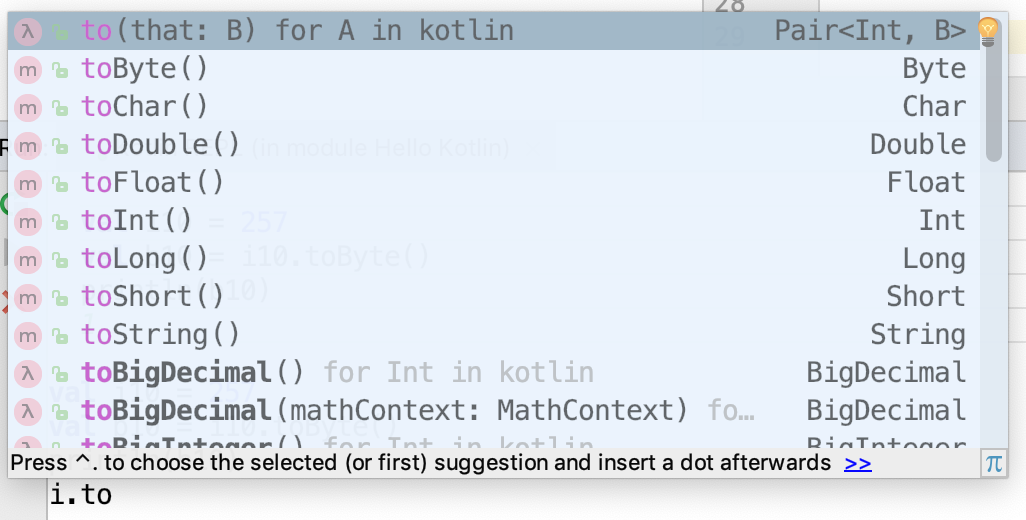
- Select
toByte() from the list, then print the variable.
val b1 = i.toByte()
println(b1)
⇒ 6
- Assign a
Byte value to variables of different types.
val b2: Byte = 1 // OK, literals are checked statically
println(b2)
⇒ 1
val i1: Int = b2
⇒ error: type mismatch: inferred type is Byte but Int was expected
val i2: String = b2
⇒ error: type mismatch: inferred type is Byte but String was expected
val i3: Double = b2
⇒ error: type mismatch: inferred type is Byte but Double was expected
- For the assignments that returned errors, try casting them instead.
val i4: Int = b2.toInt() // OK!
println(i4)
⇒ 1

val i5: String = b2.toString()
println(i5)
⇒ 1

val i6: Double = b2.toDouble()
println(i6)
⇒ 1.0
- To make long numeric constants more readable, Kotlin allows you to place underscores in the numbers, where it makes sense to you. Try entering different numeric constants.
val oneMillion = 1_000_000
val socialSecurityNumber = 999_99_9999L
val hexBytes = 0xFF_EC_DE_5E
val bytes = 0b11010010_01101001_10010100_10010010
Step 3: Learn the value of variable types
Kotlin supports two types of variables: changeable and unchangeable. With val, you can assign a value once. If you try to assign something again, you get an error. With var, you can assign a value, then change the value later in the program.
- Define variables using
valandvarand then assign new values to them.
var fish = 1
fish = 2
val aquarium = 1
aquarium = 2
⇒ error: val cannot be reassigned
You can assign fish a value, then assign it a new value, because it is defined with var. Trying to assign a new value to aquarium gives an error because it is defined with val.
The type you store in a variable is inferred when the compiler can figure it out from context. If you want, you can always specify the type of a variable explicitly, using the colon notation.
- Define some variables and specify the type explicitly.
var fish: Int = 12
var lakes: Double = 2.5
Once a type has been assigned by you or the compiler, you can't change the type, or you get an error.
Step 4: Learn about strings
Strings in Kotlin work pretty much like strings in any other programming language using " for strings and ' for single characters, and you can concatenate strings with the + operator. You can create string templates by combining them with values; the $variable name is replaced with the text representing the value. This is called variable interpolation.
- Create a string template.
val numberOfFish = 5
val numberOfPlants = 12
"I have $numberOfFish fish" + " and $numberOfPlants plants"
⇒ res20: kotlin.String = I have 5 fish and 12 plants
- Create a string template with an expression in it. As in other languages, the value can be the result of an expression. Use curly braces
{}to define the expression.
"I have ${numberOfFish + numberOfPlants} fish and plants"
⇒ res21: kotlin.String = I have 17 fish and plants
3. Task: Compare conditions and booleans
In this task, you learn about booleans and checking conditions in the Kotlin programming language. Like other languages, Kotlin has booleans and boolean operators such as less than, equal to, greater than, and so on (<, ==, >, !=, <=, >=).
- Write an
if/elsestatement.
val numberOfFish = 50
val numberOfPlants = 23
if (numberOfFish > numberOfPlants) {
    println("Good ratio!")
} else {
    println("Unhealthy ratio")
}
⇒ Good ratio!
- Try a range in an
ifstatement. In Kotlin, the condition you test can use ranges, too.
val fish = 50
if (fish in 1..100) {
    println(fish)
}
⇒ 50
- Write an
ifwith multiple cases. For more complicated conditions, use logical and&&and logical or||. As in other languages, you can have multiple cases by usingelse if.
if (numberOfFish == 0) {
    println("Empty tank")
} else if (numberOfFish < 40) {
    println("Got fish!")
} else {
    println("That's a lot of fish!")
}
⇒ That's a lot of fish!
- Try out a
whenstatement. There's a nicer way to write that series ofif/else if/elsestatements in Kotlin, using thewhenstatement, which is like theswitchstatement in other languages. Conditions in awhenstatement can use ranges, too.
when (numberOfFish) {
    0  -> println("Empty tank")
    in 1..39 -> println("Got fish!")
    else -> println("That's a lot of fish!")
}
⇒ That's a lot of fish!
4. Task: Learn about nullability
In this task, you learn about nullable versus non-nullable variables. Programming errors involving nulls have been the source of countless bugs. Kotlin seeks to reduce bugs by introducing non-nullable variables.
Step 1: Learn about nullability
By default, variables cannot be null.
- Declare an
Intand assignnullto it.
var rocks: Int = null
⇒ error: null can not be a value of a non-null type Int
- Use the question mark operator,
?, after the type to indicate that a variable can be null. Declare anInt?and assignnullto it.
var marbles: Int? = nullWhen you have complex data types, such as a list:
- You can allow the elements of the list to be null.
- You can allow for the list to be null, but if it's not null its elements cannot be null.
- You can allow both the list or the elements to be null.
Lists and some other complex data types are covered in a later task.
Step 2: Learn about the ? and ?: operators
You can test for null with the ? operator, saving you the pain of writing many if/else statements.
- Write some code the longer way to check whether the
fishFoodTreatsvariable is notnull. Then decrement that variable.
var fishFoodTreats = 6
if (fishFoodTreats != null) {
    fishFoodTreats = fishFoodTreats.dec()
}
- Now look at the Kotlin way of writing it, using the
?operator.
var fishFoodTreats = 6
fishFoodTreats = fishFoodTreats?.dec()
- You can also chain null tests with the
?:operator. Look at this example:
fishFoodTreats = fishFoodTreats?.dec() ?: 0
It's shorthand for "if fishFoodTreats is not null, decrement and use it; otherwise use the value after the ?:, which is 0." If fishFoodTreats is null, evaluation is stopped, and the dec() method is not called.
A point about null pointers
If you really love NullPointerExceptions, Kotlin lets you keep them. The not-null assertion operator, !! (double-bang), converts any value to a non-null type and throws an exception if the value is null.
val len = s!!.length // throws NullPointerException if s is null
5. Task: Explore arrays, lists, and loops
Step 1: Make lists
Lists are a fundamental type in Kotlin, and are similar to lists in other languages.
- Declare a list using
listOfand print it out. This list cannot be changed.
val school = listOf("mackerel", "trout", "halibut")
println(school)
⇒ [mackerel, trout, halibut]
- Declare a list that can be changed using
mutableListOf. Remove an item.
val myList = mutableListOf("tuna", "salmon", "shark")
myList.remove("shark")
⇒ res36: kotlin.Boolean = true
The remove() method returns true when it successfully removes the item passed.
Step 2: Create arrays
Like other languages, Kotlin has arrays. Unlike lists in Kotlin, which have mutable and immutable versions, there is no mutable version of an Array. Once you create an array, the size is fixed. You can't add or remove elements, except by copying to a new array.
The rules about using val and var are the same with arrays as with lists.
- Declare an array of strings using
arrayOf. Use thejava.util.Arrays.toString()array utility to print it out.
val school = arrayOf("shark", "salmon", "minnow")
println(java.util.Arrays.toString(school))
⇒ [shark, salmon, minnow]
- An array declared with
arrayOfdoesn't have a type associated with the elements, so you can mix types, which is helpful. Declare an array with different types.
val mix = arrayOf("fish", 2)
- You can also declare arrays with one type for all the elements. Declare an array of integers using
intArrayOf(). There are corresponding builders, or instantiation functions, for arrays of other types.
val numbers = intArrayOf(1,2,3)
- Combine two arrays with the
+operator.
val numbers = intArrayOf(1,2,3)
val numbers3 = intArrayOf(4,5,6)
val foo2 = numbers3 + numbers
println(foo2[5])
=> 3
- Try out different combinations of nested arrays and lists. As in other languages, you can nest arrays and lists. That is, when you put an array within an array, you have an array of arrays—not a flattened array of the contents of the two. The elements of an array can also be lists, and the elements of lists can be arrays.
val numbers = intArrayOf(1, 2, 3)
val oceans = listOf("Atlantic", "Pacific")
val oddList = listOf(numbers, oceans, "salmon")
println(oddList)
⇒ [[I@89178b4, [Atlantic, Pacific], salmon]
The first element, numbers, is an Array. When you don't use the array utility to print it, Kotlin prints the address instead of the contents of the array.
- One nice feature of Kotlin is that you can initialize arrays with code instead of initializing them to 0. Try this example:
val array = Array (5) { it * 2 }
println(java.util.Arrays.toString(array))
⇒ [0, 2, 4, 6, 8]
The initialization code is between the curly braces, {}. In the code, it refers to the array index, starting with 0.
Step 3: Make loops
Now that you have lists and arrays, looping through the elements works as you might expect.
- Create an array. Use a
forloop to iterate through the array and print the elements.
val school = arrayOf("shark", "salmon", "minnow")
for (element in school) {
    print(element + " ")
}
⇒ shark salmon minnow
- In Kotlin, you can loop through the elements and the indexes at the same time. Try this example:
for ((index, element) in school.withIndex()) {
    println("Item at $index is $element\n")
}
⇒ Item at 0 is shark
Item at 1 is salmon
Item at 2 is minnow
- Try different step sizes and ranges. You can specify ranges of numbers or of characters, alphabetically. And as in other languages, you don't have to step forward by 1. You can step backward using
downTo.
for (i in 1..5) print(i)
⇒ 12345

for (i in 5 downTo 1) print(i)
⇒ 54321

for (i in 3..6 step 2) print(i)
⇒ 35

for (i in 'd'..'g') print (i)
⇒ defg
- Try out some loops. Like other languages, Kotlin has
whileloops,do...whileloops, and++and--operators. Kotlin also hasrepeatloops.
var bubbles = 0
while (bubbles < 50) {
    bubbles++
}
println("$bubbles bubbles in the water\n")

do {
    bubbles--
} while (bubbles > 50)
println("$bubbles bubbles in the water\n")

repeat(2) {
     println("A fish is swimming")
}
⇒ 50 bubbles in the water
49 bubbles in the water
A fish is swimmingA fish is swimming
6. Summary
Kotlin is very similar to other languages when it comes to the basics like operators, lists, and loops, but there are some important differences.
The following features may be different in Kotlin than what you're used to in other languages:
- Kotlin types can't be implicitly converted—use casting.
- Variables declared with
valcan only be assigned once. - Kotlin variables are not nullable by default. Use
?to make variables nullable. - With Kotlin, you can loop through the index and elements of an array at the same time in a
forloop.
The following Kotlin programming constructs are similar to those in other languages:
- Arrays and lists can have a single type or mixed types.
- Arrays and lists can be nested.
- You can create loops with
for,while,do/while, andrepeat. - The
whenstatement is Kotlin's version of theswitchstatement, butwhenis more flexible.
7. Learn more
Kotlin documentation
If you want more information on any topic in this course, or if you get stuck, https://kotlinlang.org is your best starting point.
- Kotlin coding conventions
- Kotlin idioms
- Explicit type conversion
- Defining variables
- String templates
- Nullable values
- Lists
- Arrays
if,when,for,while?:(Elvis) operator!!operator
Kotlin tutorials
The https://play.kotlinlang.org website includes rich tutorials called Kotlin Koans, a web-based interpreter, and a complete set of reference documentation with examples.
Udacity course
To view the Udacity course on this topic, see Kotlin Bootcamp for Programmers.
IntelliJ IDEA
Documentation for the IntelliJ IDEA can be found on the JetBrains website.
8. Homework
This section lists possible homework assignments for students who are working through this codelab as part of a course led by an instructor. It's up to the instructor to do the following:
- Assign homework if required.
- Communicate to students how to submit homework assignments.
- Grade the homework assignments.
Instructors can use these suggestions as little or as much as they want, and should feel free to assign any other homework they feel is appropriate.
If you're working through this codelab on your own, feel free to use these homework assignments to test your knowledge.
Answer these questions
Question 1
Which of the following declares an unchangeable list of strings?
▢ val school = arrayOf("shark", "salmon", "minnow")
▢ var school = arrayOf("shark", "salmon", "minnow")
▢ val school = listOf("shark", "salmon", "minnow")
▢ val school = mutableListOf("shark", "salmon", "minnow")
Question 2
What will be the output of the following code? for (i in 3..8 step 2) print(i)
▢ 345678
▢ 468
▢ 38
▢ 357
Question 3
What is the purpose of the question mark in this code? var rocks: Int? = 3
▢ The type of the variable rocks isn't fixed.
▢ The variable rocks can be set to null.
▢ The variable rocks cannot be set to null.
▢ The variable rocks shouldn't be initialized right away.
9. Next codelab
Proceed to the next lesson:
For an overview of the course, including links to other codelabs, see "Kotlin Bootcamp for Programmers: Welcome to the course."
Introduction
In this codelab, you create a Kotlin program and learn about functions in Kotlin, including default values for parameters, filters, lambdas, and compact functions.
What you'll learn
- How to create a program with a
main()function and arguments in IntelliJ IDEA - How to use default values and compact functions
- How to apply filters for lists
- How to create basic lambdas and higher-order functions
2. Task: Explore the main() function
In this task, you create a Kotlin program and learn about the main() function, as well as how to pass arguments to a program from the command line.
You may remember the printHello() function that you entered into the REPL in a previous codelab:
fun printHello() {
    println ("Hello World")
}

printHello()
⇒ Hello World




0 Comments